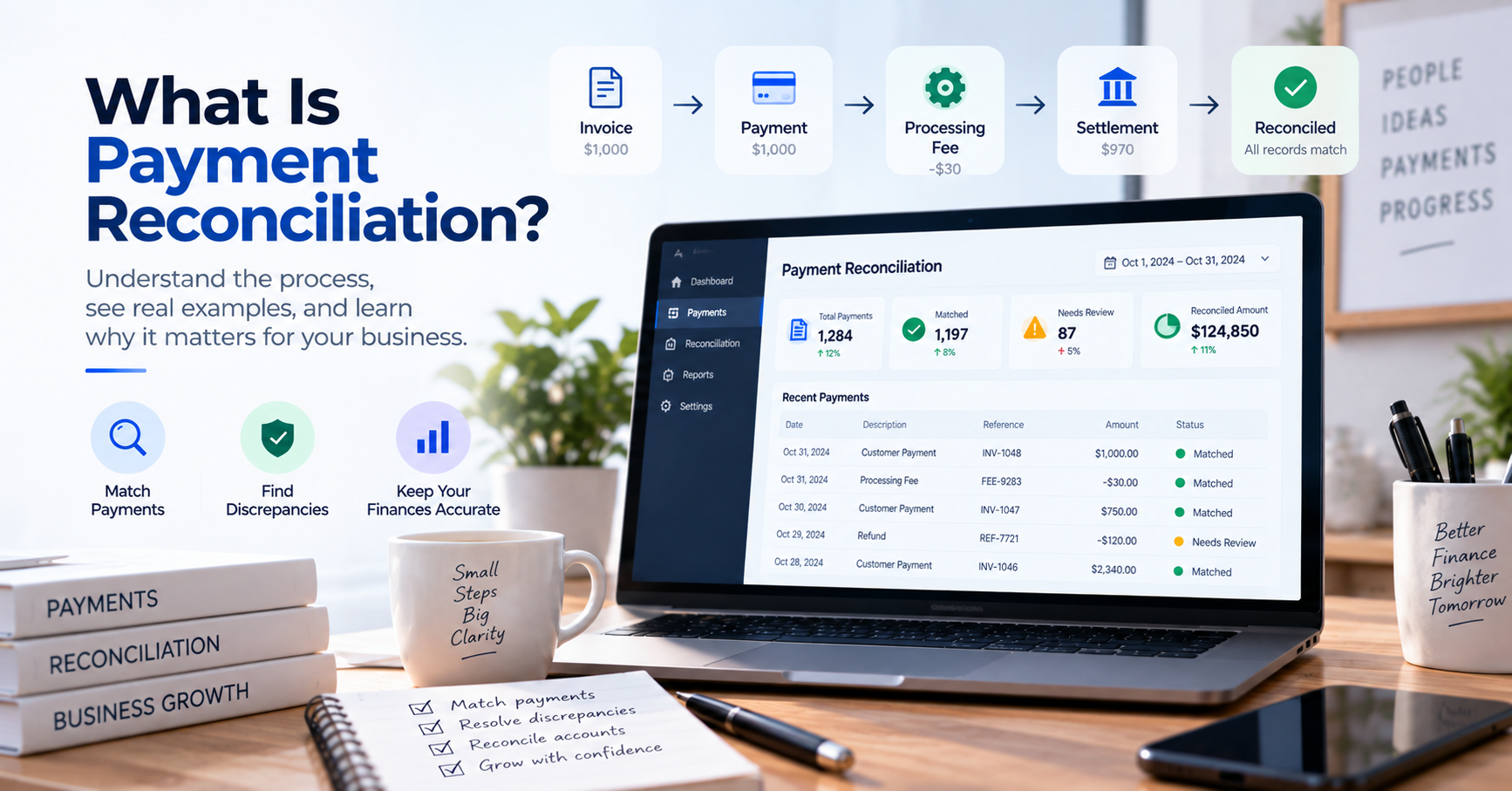
What Is Payment Reconciliation? A Practical Guide for Businesses
A customer says they paid yesterday.
Your sales system shows the invoice as unpaid.
Your payment provider shows a successful transaction.
Your bank account shows a deposit—but the amount is slightly different because fees were deducted.
Which record is correct?
Possibly all of them.
This is exactly why businesses perform payment reconciliation.
Payment reconciliation is the process of comparing payment records from different sources to confirm that money expected by a business was actually received, recorded correctly, and associated with the right transaction.
For a small company processing a handful of payments, this can be straightforward.
For a business processing thousands of card payments, bank transfers, refunds, fees, and payment gateway settlements, it can become one of the most time-consuming parts of financial operations.
This guide explains what payment reconciliation is, how it works, why discrepancies occur, and how businesses can make the process more efficient.
What Is Payment Reconciliation?
Payment reconciliation is the process of comparing payment transactions with internal financial records and external payment or banking records to verify that they agree.
In practical terms, a business may compare information from:
- Invoices
- Orders
- Accounting software
- Bank accounts
- Payment gateways
- Credit card processors
- Digital wallets
- Point-of-sale systems
- Marketplace platforms
The objective is to answer several basic questions:
Did we receive the payment?
Did we receive the correct amount?
Was it recorded against the correct customer or order?
Were any fees, refunds, or adjustments applied?
Did the money actually reach our bank account?
A successful payment in one system does not always mean that the entire financial process has been completed correctly.
That is why reconciliation matters.
A Simple Payment Reconciliation Example
Imagine that your business sells a product for $1,000.
Your order management system records:
Order #1048 — $1,000 — Paid
Your payment processor records:
Payment — $1,000 — Successful
But your bank receives:
$970
At first glance, there appears to be a $30 discrepancy.
After investigation, you discover:
- Customer payment: $1,000
- Processing fee: $30
- Net settlement: $970
Everything is correct.
The records simply represent different stages of the payment.
A good payment reconciliation process should be able to explain the relationship:
$1,000 sale → $1,000 payment → $30 fee → $970 bank deposit
Without reconciliation, someone looking only at the bank account might incorrectly conclude that $30 is missing.
Why Is Payment Reconciliation Important?
The purpose of reconciliation is not simply to make numbers match.
It helps a business understand what actually happened to its money.
1. Verify That Customers Actually Paid
An invoice marked “Paid” should ultimately correspond with a real payment.
Reconciliation helps verify that the expected money was received.
This is especially important when payment status is updated manually.
2. Identify Missing Payments
Your internal system may show a payment that does not appear in your bank or payment provider records.
This could result from:
- Processing delays
- Failed transactions
- Incorrect payment status
- Integration problems
- Human error
Without reconciliation, the discrepancy may remain unnoticed.
3. Find Duplicate Transactions
A payment can occasionally be recorded more than once.
Duplicate records can distort:
- Revenue
- Accounts receivable
- Cash balances
- Customer balances
Reconciliation helps identify transactions that appear more than once.
4. Understand Payment Processing Fees
Payment providers often deduct fees before transferring money to your bank.
Suppose customers paid a total of:
$25,000
Your payment processor deducted:
$750
Your bank received:
$24,250
Those three numbers are different, but all may be correct.
Payment reconciliation creates the connection between them.
5. Track Refunds and Chargebacks
The payment lifecycle does not always end when a customer pays.
A transaction may later be:
- Partially refunded
- Fully refunded
- Disputed
- Charged back
- Reversed
These events affect the amount of money the business ultimately receives.
Reconciliation helps ensure they are reflected correctly in financial records.
6. Improve Financial Reporting
Financial reports are only as reliable as the transactions behind them.
Unreconciled payments can lead to inaccurate:
- Revenue reports
- Cash-flow statements
- Accounts receivable balances
- Customer balances
- Management reports
Regular reconciliation improves confidence in the underlying financial data.
How Does Payment Reconciliation Work?
A typical payment reconciliation process can be divided into several stages.
Step 1: Collect Payment Records
First, gather transaction information from relevant systems.
Depending on the business, this may include:
Internal records
- Orders
- Invoices
- Customer accounts
- Accounting entries
External records
- Bank transactions
- Payment gateway transactions
- Card processor settlements
- Marketplace payouts
The more payment channels a business uses, the more important it becomes to centralize this information.
Step 2: Match Transactions
Next, compare transactions across the different systems.
Matching may use:
- Transaction amount
- Date
- Order number
- Invoice number
- Payment reference
- Customer
- Transaction ID
- Bank reference
For example:
Invoice
INV-1029
$850
Customer ABC
Payment
Reference: INV-1029
$850
Customer ABC
This is a straightforward match.
But real payment data is not always so clean.
Step 3: Identify Discrepancies
Transactions that cannot be matched should be investigated.
Common discrepancies include:
- Missing payments
- Incorrect amounts
- Duplicate transactions
- Processing fees
- Partial payments
- Refunds
- Chargebacks
- Settlement delays
- Currency conversion differences
- Incorrect references
The purpose of the system should be to make these exceptions easy to find.
Step 4: Investigate Exceptions
Suppose an invoice is for $5,000 but the bank receives $4,950.
The difference could be:
- A bank fee
- A processing fee
- An incorrect payment
- A partial payment
- A currency conversion difference
Someone needs to determine which explanation is correct.
This is where human judgment remains important even when much of reconciliation is automated.
Step 5: Update Financial Records
Once the difference has been explained, the relevant records can be updated.
This might involve:
- Marking an invoice as paid
- Recording a payment-processing fee
- Recording a refund
- Correcting a duplicate entry
- Updating a customer balance
- Creating an adjustment
Step 6: Complete the Reconciliation
The process is complete when the business can explain the relationship between its expected payments, actual payment activity, and the money ultimately received.
A good reconciliation process leaves fewer unexplained transactions behind.
Payment Reconciliation vs. Bank Reconciliation
These terms are related, but they are not exactly the same.
Bank reconciliation focuses primarily on comparing transactions recorded in a company’s books with transactions appearing in its bank account.
Payment reconciliation can cover a broader payment journey.
For example:
Customer Order
↓
Invoice
↓
Customer Payment
↓
Payment Processor
↓
Fees / Refunds / Adjustments
↓
Settlement
↓
Bank Account
Payment reconciliation can verify several stages of this chain.
Bank reconciliation is primarily concerned with ensuring that the company’s accounting records agree with its bank records.
A business may therefore perform both.
| Payment Reconciliation | Bank Reconciliation |
|---|---|
| Focuses on payment lifecycle | Focuses on bank vs. book records |
| Can include orders and invoices | Primarily financial/accounting records |
| Can include payment gateways | Uses bank transactions |
| Tracks processing fees | Tracks bank-related differences |
| Can include refunds/chargebacks | Confirms bank balance accuracy |
| May happen before settlement | Usually verifies settled bank activity |
The processes overlap, but they answer slightly different questions.
Payment Reconciliation vs. Settlement
Another common source of confusion is the difference between a payment and a settlement.
A customer successfully paying does not necessarily mean the money is already in your bank account.
For example:
Monday
Customer pays $500.
Monday
Payment gateway reports:
Payment successful — $500
Tuesday
Provider deducts:
Processing fee — $15
Wednesday
Bank receives:
Settlement — $485
The payment happened on Monday.
The settlement happened on Wednesday.
Reconciliation needs to understand that these records belong to the same financial event.
What Is Three-Way Payment Reconciliation?
Some businesses reconcile more than two data sources.
A simple three-way reconciliation might compare:
1. Business Record
What should have been paid?
2. Payment Provider Record
What did the payment provider process?
3. Bank Record
What money actually arrived?
For example:
| Source | Amount |
|---|---|
| Customer Invoice | $1,000 |
| Payment Processor | $1,000 |
| Bank Settlement | $970 |
| Processing Fee | $30 |
The apparent $30 discrepancy is explained by the processing fee.
This approach can be particularly valuable for businesses receiving payments through third-party platforms.
Common Payment Reconciliation Problems
Understanding common discrepancies makes reconciliation easier.
Missing Payment
Your system says the customer paid, but there is no corresponding external transaction.
Possible causes include:
- Incorrect payment status
- Failed transaction
- Wrong payment account
- Integration failure
- Delayed processing
Missing Reference
The payment exists, but you cannot determine who sent it.
This frequently happens with bank transfers.
The amount may be correct, but the customer entered an incorrect or incomplete reference.
Someone must investigate the transaction before it can be matched confidently.
Partial Payment
Invoice:
$1,000
Payment:
$600
The transaction is legitimate but cannot be treated as full payment.
The remaining balance is:
$400
The reconciliation process needs to preserve that relationship.
Combined Payment
A customer pays several invoices with one transfer.
Invoice A: $500
Invoice B: $300
Invoice C: $200
Bank transaction:
$1,000
The system needs to support:
One payment → Multiple invoices
Split Payment
The opposite can also occur.
Invoice:
$1,000
Customer payments:
$400
$300
$300
Now the relationship is:
Multiple payments → One invoice
Simple one-to-one matching rules may struggle with these situations.
Processing Fees
Gross payment and net settlement may differ.
For example:
Gross sales: $10,000
Processing fees: $300
Net settlement: $9,700
The $300 difference should not automatically be treated as missing money.
Refunds
A payment may have been correct when originally reconciled but later partially or fully refunded.
The financial records should reflect both events.
Chargebacks
Card disputes can create another layer of complexity.
A business may initially receive payment and later lose some or all of it through a chargeback.
Reconciliation needs to track the entire lifecycle rather than only the original payment.
Timing Differences
The invoice, payment, settlement, and bank deposit may all occur on different dates.
For example:
Invoice issued: March 1
Customer pays: March 5
Processor settles: March 7
Bank records funds: March 8
Strict date matching could incorrectly treat these as unrelated transactions.
Manual Payment Reconciliation
Small businesses often begin with spreadsheets.
A basic process might involve exporting:
- Invoices from accounting software
- Payments from a gateway
- Transactions from the bank
Then someone compares the files manually.
For low transaction volumes, this may be perfectly reasonable.
The difficulty appears as volume grows.
Suppose your company processes 5,000 payments every month.
If checking each payment manually takes just 20 seconds:
5,000 × 20 seconds = 100,000 seconds
That is almost 28 hours of checking.
And this does not include the time required to investigate exceptions.
At this point, automation becomes much more attractive.
What Is Automated Payment Reconciliation?
Automated payment reconciliation uses software to collect, compare, and match transaction records with less manual intervention.
A typical workflow might look like:
Invoice / Order
↓
Payment Received
↓
Transaction Data Imported
↓
Automatic Matching
↓
High-Confidence Match → Reconciled
Uncertain Match → Human Review
This changes the role of the finance team.
Instead of reviewing every payment, employees concentrate on transactions the system cannot explain confidently.
What Can Be Automated?
Businesses can potentially automate several parts of the reconciliation process.
Transaction Collection
Bank and payment transaction data can be imported automatically where supported.
Transaction Matching
Software can compare amounts, references, dates, transaction IDs, and other information.
Categorization
Recurring transactions can be categorized according to predefined rules.
Duplicate Detection
Potential duplicate records can be flagged.
Exception Identification
Transactions that do not meet matching conditions can automatically enter a review queue.
Reporting
Reconciliation reports can be generated without manually rebuilding spreadsheets.
Automation does not mean every transaction should be accepted without review.
The strongest approach is usually:
Automate predictable transactions. Review exceptions.
How Often Should Payment Reconciliation Be Done?
The appropriate frequency depends on transaction volume.
Monthly
May be sufficient for a very small business with relatively few payments.
Weekly
Often more practical for businesses with regular transaction activity.
Daily
Useful for businesses processing many customer payments.
Continuous or Near Real-Time
May be appropriate for businesses where payment verification directly affects order fulfillment or service delivery.
More frequent reconciliation has an important advantage:
Problems are discovered sooner.
Investigating an unidentified payment from yesterday is usually easier than investigating one from three months ago.
Which Businesses Benefit Most?
Payment reconciliation is useful for almost any organization receiving money, but some businesses face greater complexity.
E-commerce
Online stores may process:
- Card payments
- Wallet payments
- Refunds
- Gateway fees
- Marketplace payments
High transaction volumes make automation particularly useful.
Subscription Businesses
Recurring billing creates large numbers of predictable transactions.
This can make subscription payments good candidates for automated matching.
Marketplaces
Marketplaces may need to reconcile:
- Buyer payments
- Platform fees
- Seller balances
- Refunds
- Payouts
This is considerably more complicated than simple bank reconciliation.
Businesses Receiving Bank Transfers
Bank transfers create a different problem.
The money may arrive successfully, but employees still need to determine:
Who paid us?
For businesses receiving hundreds of transfers per day, payment verification itself can become a significant operational workload.
Accounting Firms
Accounting practices performing reconciliation for many clients can benefit from reducing repetitive transaction matching.
Automation allows accountants to spend more time investigating exceptions and providing financial advice.
Payment Reconciliation for Bank Transfers
Bank transfers deserve special attention because they remain common in many markets.
Imagine an online seller receiving 300 transfers per day across four bank accounts.
Customers constantly ask:
“Did you receive my payment?”
Without centralized transaction information, employees may need to:
- Ask which bank the customer transferred to.
- Open that bank’s system.
- Search transaction history.
- Find the amount.
- Compare the time.
- Confirm the customer.
- Update the order.
Repeat this hundreds of times and payment verification becomes expensive.
A centralized transaction system can simplify the workflow:
Multiple Bank Accounts → Central Transaction View → Search → Verify Payment
This is one area where platforms focused on bank transaction management, such as AutoBookBank, can complement traditional accounting software.
The objective is not necessarily to replace accounting.
It is to reduce the operational work involved in finding and verifying payments.
How to Improve Your Payment Reconciliation Process
You do not need to automate everything immediately.
Start with the process itself.
Step 1: Map Every Payment Channel
List every place where customers can pay you.
For example:
- Bank transfer
- Credit card
- PayPal
- Stripe
- Marketplace
- Cash
- Digital wallet
You cannot reconcile what you do not know exists.
Step 2: Standardize References
Whenever possible, require customers or systems to include:
- Order number
- Invoice number
- Customer ID
- Payment reference
Good references dramatically improve automatic matching.
Step 3: Centralize Transaction Data
Reduce the number of systems employees need to check.
The fewer places your team searches for transactions, the easier reconciliation becomes.
Step 4: Automate Obvious Matches
Begin with transactions where:
- Amount matches
- Reference matches
- Customer matches
Do not begin by trying to automate complicated exceptions.
Step 5: Create an Exception Queue
Anything uncertain should go somewhere clearly visible.
For example:
Matched
No action required.
Needs Review
Someone should investigate.
Unmatched
No corresponding record found.
Possible Duplicate
Requires verification.
This is much more efficient than treating every transaction equally.
Step 6: Measure the Process
Track metrics such as:
- Total payments
- Automatically matched payments
- Unmatched payments
- Exceptions
- Average reconciliation time
- Incorrect matches
- Time spent investigating payments
You cannot improve a process effectively without knowing where the time is going.
Payment Reconciliation Checklist
A simple daily or weekly reconciliation checklist might look like this:
- Import new payment transactions
- Confirm transaction data is complete
- Match payments against invoices or orders
- Review automatic matches
- Investigate unmatched transactions
- Identify partial and combined payments
- Record processing fees
- Check refunds
- Check chargebacks
- Verify settlement amounts
- Compare settlements with bank deposits
- Resolve remaining discrepancies
- Update accounting records
- Complete reconciliation
- Preserve reconciliation history
The exact process should reflect your payment methods and internal controls.
Frequently Asked Questions
What does payment reconciliation mean?
Payment reconciliation means comparing payment information from different systems to confirm that expected payments were actually received and recorded correctly.
This may involve comparing invoices, orders, payment processors, accounting records, and bank transactions.
What is an example of payment reconciliation?
Suppose an invoice is for $500.
Your payment provider shows a successful $500 payment, deducts a $15 fee, and transfers $485 to your bank.
Reconciliation confirms that:
$500 invoice = $500 payment − $15 fee = $485 settlement
The different amounts are explained rather than treated as discrepancies.
What is the difference between payment reconciliation and bank reconciliation?
Payment reconciliation focuses on the payment lifecycle and may compare invoices, orders, payment processors, fees, refunds, settlements, and bank deposits.
Bank reconciliation primarily compares bank transactions with accounting records to confirm that the bank balance and book balance can be reconciled.
Why do payment reconciliation discrepancies happen?
Common causes include processing fees, missing references, timing differences, partial payments, combined payments, refunds, chargebacks, currency conversion, duplicate transactions, and human error.
A discrepancy does not automatically mean money is missing.
It means the difference needs to be explained.
Can payment reconciliation be automated?
Yes.
Software can automate transaction imports, matching, categorization, duplicate detection, exception identification, and reporting.
Transactions that cannot be matched confidently should generally be sent for human review.
Is payment reconciliation part of accounting?
Yes, payment reconciliation contributes to accurate accounting and financial controls, although the operational process may involve systems outside the accounting platform, such as payment gateways, banks, marketplaces, and order management systems.
Final Thoughts
Payment reconciliation ultimately answers a simple question:
Did the money we expected to receive actually arrive, and was everything recorded correctly?
Answering that question becomes surprisingly complicated as a business grows.
One customer payment can generate several financial records:
Order → Invoice → Payment → Fee → Settlement → Bank Transaction
Each record represents a different part of the same financial event.
A good payment reconciliation process connects those pieces.
For a small business with relatively few transactions, manual reconciliation may be sufficient.
As payment volume increases, however, repeatedly downloading files, checking banking applications, searching transactions, and matching payments manually becomes increasingly difficult to justify.
That is where automation becomes valuable.
The objective is not to eliminate human financial oversight.
It is to let software handle predictable transaction work while people focus on exceptions that genuinely require investigation.
When done well, payment reconciliation gives a business something more valuable than tidy accounting records:
confidence that the money it believes it received is the money it actually received.